
Sportzfy APK Download | Watch Free Sports live And News Channels
If you want to use Sportzfy on an Android device, the Sportzfy APK is the file used to install the app manually. Once installed, you can access the main Sportzfy sections, including live and upcoming events, sports channels, TV Mode, Categories, Highlights, Favourites, and different playback tools.
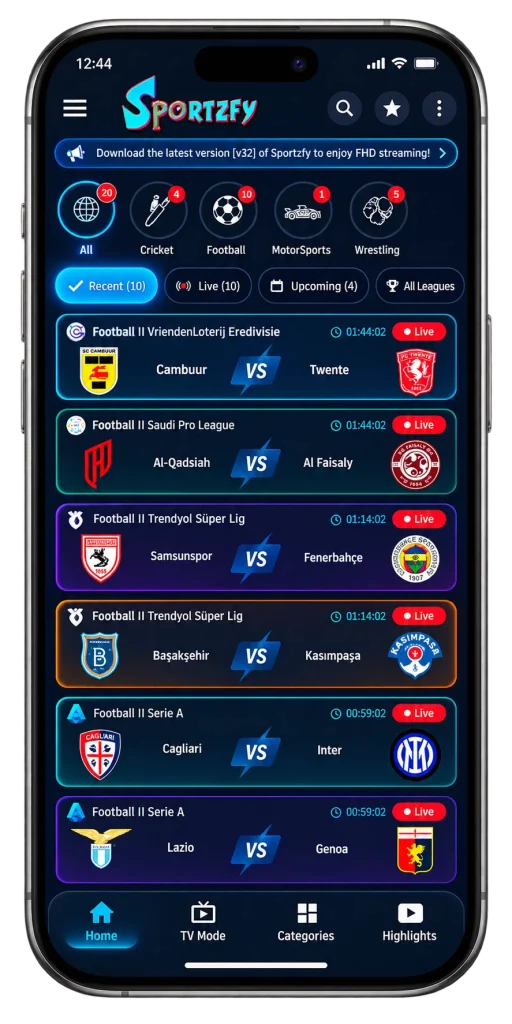
Sportzfy also includes Live Events – HD and Live Events – SD categories, sports filters for Cricket, Football, MMA, MotorSports, and Wrestling, plus extra options such as Floating Player, Playlists/IPTV, Network Stream, and video quality settings.
How to Install Sportzfy APK on Android
Because an APK is installed outside the regular app-store process, Android may ask for permission before the installation can continue. The exact wording can vary depending on your Android version and device.
- Download the Sportzfy APK file to your Android device.
- Open the downloaded APK file.
- If Android blocks the installation, open the permission shown on the screen.
- Enable permission to install unknown apps for the browser or file manager you used to open the APK.
- Return to the Sportzfy APK file and tap Install.
- Wait for the installation to finish.
- Tap Open to launch Sportzfy.
After installation, you can return to the permission settings and disable third-party app installation again if you do not need it.
Why Android Asks for Third-Party APK Permission
Android normally restricts apps installed from outside its usual app-store process. When you install an APK manually, the system asks you to approve the source you are using, such as your browser or file manager.
This permission does not need to stay enabled permanently. You can turn it on for the installation and switch it off again afterward.
Before Installing the APK
Make sure you are using the Sportzfy APK you intended to download before starting the installation. Avoid installing files from sources you do not recognize, and pay attention to the permissions Android shows during the process.
Once Sportzfy is installed, you can open the app and start exploring its Home, TV Mode, Categories, Highlights, Favourites, sports filters, channels, and playback settings.
Download Sportzfy APK
If you’re ready to use Sportzfy, download the APK and install it on your Android device. After installation, you can access live and upcoming events, sports channels, TV Mode, Categories, Highlights, Favourites, HD/SD event sections, and the additional playback tools covered above.
Once installed, open Sportzfy and start from the Home screen, or move directly into TV Mode, Categories, Highlights, Favourites, playlists, and other supported sections.